
Every plan
Run your Gydr account from your AI assistant
This is for the people who run the account. It is separate from the MCP connector Plugin, which lets your chatbot call someone else's MCP server.
Add our new Sunday opening hours to the Riverside store.
update_location · Bloom & Twig
Done. I updated the Riverside location in Bloom & Twig. Sunday now reads 10 am to 6 pm.
What it can do
The everyday Console jobs, by conversation
Ask in plain words. Each request is carried out through the same Console rules and permissions you already have.
Keep knowledge current
Look up, add, edit and remove products, FAQs, locations and documents, and start a sync. Your AI app can read a page of your website and add what it says, in your own words.
Shape the chatbot
Create and edit Skills, edit a widget's draft, and publish it when you are ready.
Review conversations
List and search conversations, read messages and see analytics. Conversations are read only.
Manage data forms
Create, edit and delete the form definitions your chatbot asks in the chat.
How it works
Connect once, then just ask
Three steps, and nothing to install.
- 1Add the serverIn your assistant, add Gydr's Console MCP address as a custom connector or MCP server.
- 2Sign in and choose an accountSign in with your Gydr login, review who is asking, and choose which account the assistant works in.
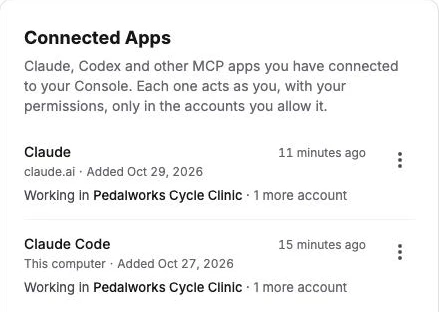
- 3Ask in plain wordsSay what you want done. Changes name the account they were made in, and you can disconnect any time from Settings.
Safe by design
Your assistant gets no more power than you have
Console MCP is built so that a mistaken or manipulated assistant cannot reach further than you could.
Same permissions as the Console
A Viewer stays read only. Someone removed from the team is refused at the very next request.
Changes name their account
Every change must say which account it is for, and a mismatch is refused. Nothing switches accounts on its own.
Secrets and exports stay out
API keys, webhooks, team management, exports and deleting a whole knowledge base or widget are not available through it.
Pay with credits, for what you use
Each tool call uses credits from the account it runs in, on its own usage line: from 3 credits for a read or a change; large or slow requests use more. The app's other requests (starting a session, listing its tools, renewing its sign-in) use from 2 credits each, and connecting an app uses a one-time fee in credits, shown before you allow it. Failed calls caused by Gydr are free.
Connect your AI assistant today
Sign up, then add Gydr's Console MCP address in Claude, Codex or another MCP client and sign in with your Gydr login.
Console MCP is included in every plan, Free included.