
Features
Everything your chatbot needs, in one dashboard.

New in Gydr
Shipped recently.
The newest things your chatbot can do. Every change is in the release notes.
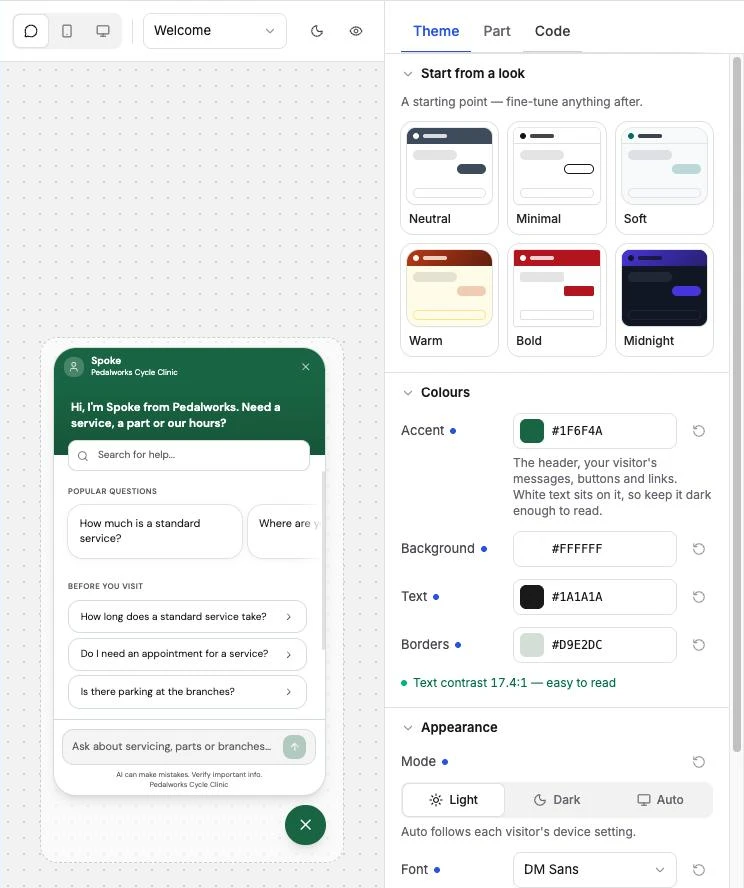
Design studio
Style the chat widget on a live preview: dark mode, curated fonts, your logo, the launcher icon and a Spotlight welcome screen. Preview the form, handoff and offline screens before you publish.
See how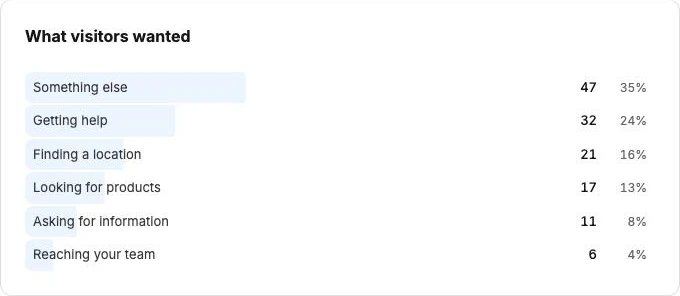
Conversation Topics
See what visitors ask about most, what they were trying to do and whether they got it. Gydr groups conversations for you; rename or merge topics, and export the results.
See how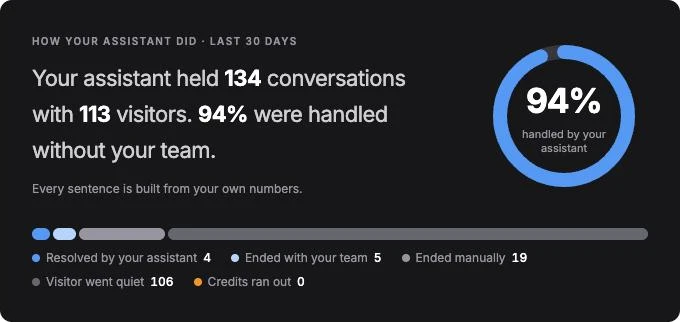
Dashboards that tell the story
The Analytics and Handoff dashboards open with a short summary of how things are going, then the numbers behind it — ready to export for your team.
See howForms inside the chat
Design a form once — a quote request, a booking request, a warranty claim. The chatbot asks the questions in the visitor's own language, a few at a time, on your website and in messaging apps. Answers arrive as rows you can view and export.
See how

Live chat, a ticket, or both
Hand over in real time, or let the visitor leave a ticket your team answers later — in Zendesk or your own help desk.
See how

Signed-in visitors, one token
Your site hands Gydr the visitor's own token and Gydr checks it — order questions need no back-and-forth, and history and memory follow the person on every device.
See how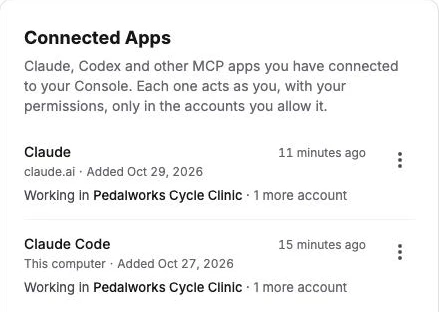
Console MCP, on every plan
Run your account from Claude, Codex or another AI assistant, with exactly the permissions you have — now on every plan, Free included.
See howFollow-up suggestions
After each reply the chatbot can offer a few next questions as tappable chips — on your website, Messenger, Instagram and Telegram.
See howThe building blocks
Six parts, one chatbot.
Each part has its own page if you want the detail. Together they are one assistant that answers everywhere you talk to customers.
Axon — the AI engine
Understands what customers mean, looks up the answer in your knowledge, and checks the reply against your records before it goes out.
Learn moreKnowledge Base
FAQs, products, documents and outlets — upload them, sync them from your store, or pull them from your website.
Learn moreSkills
Tell your chatbot how to behave in plain words, pick a personality, and connect it to your store, a Google Sheet or your own system — no code.
Learn moreModels — ours or your own
Connect OpenAI, Anthropic, Google, DeepSeek, Qwen, Mistral, Moonshot, OpenRouter, Groq, or Requesty and run your chatbot on your own provider.
Learn moreAnalytics & Insights
Read every conversation, see what customers ask and how they rate it, export transcripts, and report a reply that was wrong.
Learn moreBranding
Your logo, colours, greeting and suggested questions, your own web address — so the chatbot feels like part of your business.
Learn moreConsole MCP
Run your account from your AI assistant.
Manage knowledge, Skills, widgets and forms, and read conversations, by talking to Claude, Codex or another assistant. Included on every plan.
Built for every team
One platform, many jobs.
Give it different knowledge and different tools, and the same platform runs a sales advisor, a support desk or an internal helpdesk.
Built for teams
The controls a growing team needs.
Who can do what, what changed and when, and what happens to your customers' data — all in the dashboard.
- Roles and permissions
- Owner, Admin, Member and read-only Viewer, plus permission sets you define yourself.
- Activity log
- A record of who changed what, and when, across your account.
- Notifications
- An inbox and emails for the things that need you — low credits, a disconnected channel, a report update.
- Erase a visitor
- Delete everything stored about one visitor when they ask — conversations, form answers, memory.
- API and webhooks
- Keep your products and FAQs in sync from your own systems, and get notified as conversations happen.
- Three dashboard languages
- Your team works in English, Bahasa Melayu or Chinese; your chatbot answers in 50.
See it answer for your business.
Start on the Free plan with 500 credits. Your card is checked, never charged.