
Included on all plans
Every conversation tells a story
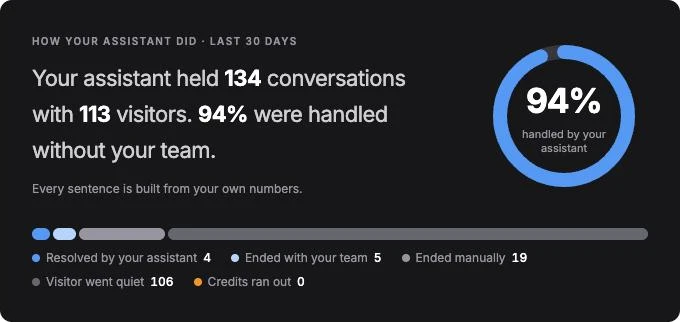
The story first
Dashboards that tell you what happened
Each dashboard opens with a short summary in plain words, then the numbers behind it.
01
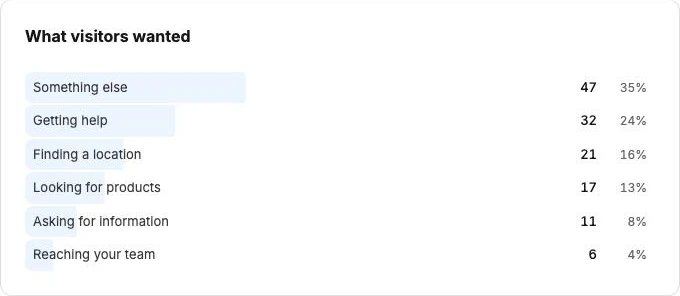
Conversation Topics: what visitors wanted
Gydr groups conversations into topics automatically — what people asked about, what they were trying to do and whether they got it. Add, rename or merge topics yourself. Topic analysis is opt-in and uses credits.
02
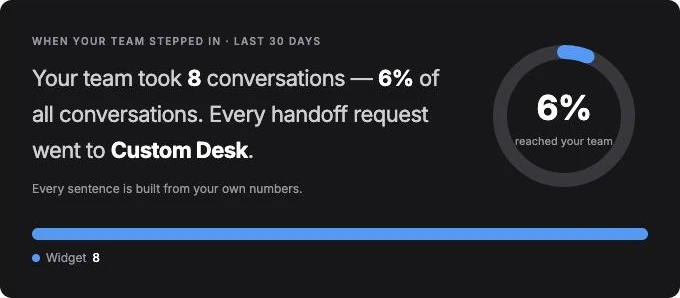
Handoff: how your team took over
See how many chats went to a person, how fast your team picked them up and how they ended — across live chats and tickets.
Export it for your team
Both dashboards export their data, so the numbers can go straight into your own reports.
Dashboard
Dashboard at a glance
The numbers behind the summary, for every chatbot and every channel.
Total conversations
Track the volume of conversations across all your chatbots. Spot trends, measure growth, and understand when your customers need help most.
Unique visitors
See how many distinct visitors are engaging with your chatbot. Understand reach beyond raw message counts.
Satisfaction rate
Visitors rate their experience at the end of each conversation. Monitor positive and negative feedback to improve quality over time.
Avg messages per session
Understand conversation depth. Shorter sessions may mean quick answers — or unresolved queries. Context tells the story.
Your audience
Know your audience
Understand who's engaging with your chatbot, where they're from, and what language they prefer — automatically.
Visitor profiles
See who's talking to your chatbot — device type, country, language, total sessions, and message count per visitor. Identify returning customers automatically.
Language detection
Automatic per-message language detection shows you which languages your customers prefer. Use the data to prioritise knowledge base translations.
Top countries
Know where your visitors are — their country is worked out from the clock setting on their device, with no outside services. Useful for planning regional campaigns and support coverage.
Device breakdown
Understand whether your audience is on mobile, desktop, or tablet. Optimise your chatbot's greeting and response length accordingly.
Conversations
Conversation history
Review the conversations your chatbot has had. Filter by status, search by content, and read the full thread. Flag a wrong reply and follow its fix, or delete everything stored about one visitor when they ask.
Status filters
Active, resolved, or expired — quickly find the conversations that need attention.
Satisfaction ratings
Per-chatbot satisfaction rate with positive/negative breakdown — measure quality where it matters.
Transcript export
Export any conversation as a structured file for review or record-keeping.
See how your chatbot is doing
See what your customers are asking, how your chatbot is performing, and where to improve.
Analytics included on all plans. No extra setup required.